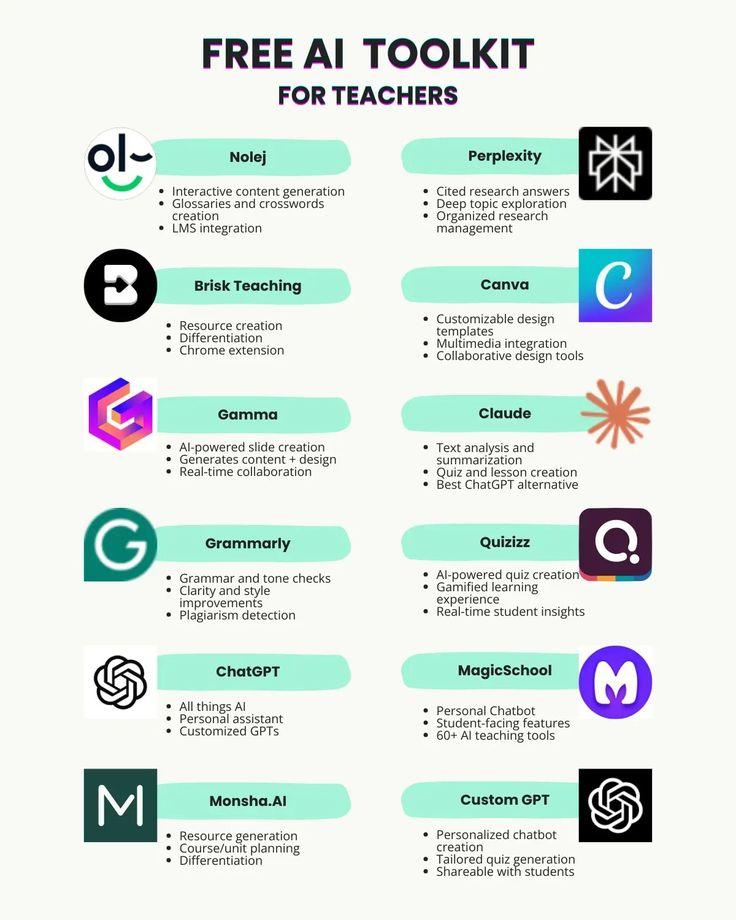
In today’s fast-paced classrooms, teachers are juggling an ever-growing list of responsibilities. Fortunately, AI tools are stepping in to lighten the load, transforming lesson planning and grading from time-consuming chores into efficient, streamlined tasks. By harnessing the power of technology, educators can reclaim valuable moments and focus more on what truly matters-engaging and inspiring their students.
Table of Contents
- AI-Powered Lesson Planning Made Effortless
- Harnessing Automation to Streamline Grading Tasks
- Personalized Learning Paths Created by Intelligent Systems
- Integrating AI Tools with Existing Educational Platforms
- Enhancing Feedback Quality Through Natural Language Processing
- Time-Saving Strategies for Adapting AI in the Classroom
- Choosing the Right AI Solutions for Diverse Teaching Needs
- Q&A
- Concluding Remarks

AI-Powered Lesson Planning Made Effortless
Imagine having a personalized assistant that instantly sketches out a detailed lesson plan tailored to your classroom needs. AI-driven platforms analyze curriculum standards, student performance data, and even current events to craft engaging, standards-aligned lessons with just a few clicks. This means teachers can spend less time hunting for resources and more time refining their teaching strategies or connecting with students.
Beyond simple content generation, these tools adapt dynamically – suggesting diverse activities, multimedia resources, and assessment methods that cater to different learning styles. For example:
- Interactive quizzes that adjust difficulty based on student responses
- Multimodal content incorporating videos, podcasts, and infographics
- Customizable templates that align lessons with real-world applications
By integrating AI into lesson planning, educators gain a powerful ally that transforms a traditionally time-consuming task into an efficient and creative process, ultimately enhancing learning outcomes while preserving valuable time.

Harnessing Automation to Streamline Grading Tasks
In today’s classrooms, the burden of manually grading assignments and quizzes can be overwhelming. Fortunately, automation tools powered by AI are revolutionizing this process, allowing educators to focus more on teaching and less on tedious grading. These digital assistants can quickly evaluate multiple-choice tests, essays, and even complex problem-solving tasks, delivering precise and consistent results within moments.
Key benefits of automated grading tools include:
- Time Efficiency: Automatic scoring reduces the hours spent reviewing papers, freeing up valuable time for individualized instruction.
- Objective Assessment: AI eliminates biases, ensuring fair and uniform evaluation standards across all student work.
- Instant Feedback: Students receive immediate responses, promoting faster learning and self-correction.
For instance, here’s how a typical automated grading workflow breaks down:
| Step | Description | Outcome |
|---|---|---|
| Submission | Students upload or submit assignments digitally. | Centralized collection of work. |
| Analysis | AI algorithms analyze content for correctness and structure. | Objective scoring based on rubric. |
| Feedback | Automated systems generate personalized comments and grades. | Quick and actionable insights for students. |
By integrating these intelligent systems, educators can transform grading from a chore into a streamlined process that supports both teaching efficacy and student development.
Personalized Learning Paths Created by Intelligent Systems
Intelligent systems have revolutionized education by crafting learning experiences tailored uniquely to each student’s pace and style. These advanced AI-driven platforms analyze vast amounts of data-from past assessments to real-time interaction patterns-to curate content that addresses individual strengths and gaps. This means every learner is guided through a journey optimized for their understanding and engagement, eliminating the “one-size-fits-all” approach that often hampers classroom effectiveness.
Teachers benefit immensely as these systems dynamically generate recommendations and adaptive lessons, allowing educators to focus more on mentorship rather than mundane administrative tasks. The AI’s ability to adjust difficulty levels and suggest supplementary materials ensures that students remain challenged without feeling overwhelmed, creating a balanced learning environment that nurtures growth.
- Real-time progress tracking: Enables instant feedback and necessary adjustments.
- Custom content delivery: Matches lessons to different learning styles like visual, auditory, or kinesthetic.
- Automated skill assessments: Identifies precise areas for improvement.
- Efficient lesson updates: Keeps learning resources fresh and relevant with minimal teacher input.
| Feature | Benefit |
|---|---|
| Adaptive Quizzes | Tailors question difficulty to learner’s level |
| Learning Analytics | Identifies engagement trends and learning gaps |
| Content Suggestions | Recommends supplemental resources to reinforce concepts |

Integrating AI Tools with Existing Educational Platforms
Seamlessly integrating AI tools with the learning management systems and digital classrooms teachers already use is key to maximizing efficiency. Many AI platforms offer plug-and-play compatibility, enabling educators to embed intelligent lesson generators, automated grading, and personalized content recommendations directly into familiar interfaces. This eliminates the need for toggling between multiple apps, fostering a smoother workflow that preserves valuable teaching time.
Highlighting popular integration methods:
- APIs that connect AI grading engines to student submission portals
- Browser extensions that augment lesson planning tools with real-time AI suggestions
- Plugins tailored for platforms like Google Classroom, Canvas, and Moodle
Here’s a quick comparison showcasing how integration enhances common educational platforms:
| Platform | AI Integration Features | Time Saved |
|---|---|---|
| Google Classroom | Auto-grading quizzes, AI lesson plans | Up to 4 hours/week |
| Canvas | Essay evaluation, personalized content | 3-5 hours/week |
| Moodle | Automated feedback, curriculum mapping | 2-4 hours/week |
By weaving AI capabilities into existing platforms, educators gain a cohesive ecosystem where automation supports creativity rather than replacing it-allowing teachers to dedicate their expertise to what matters most: inspiring students.
Enhancing Feedback Quality Through Natural Language Processing
Integrating AI-driven natural language processing (NLP) into educational tools has revolutionized how teachers receive and interpret student feedback. By employing sophisticated algorithms, these tools can analyze open-ended responses, essays, and reflections to provide concise summaries and highlight key themes, making it easier for educators to pinpoint areas in need of attention. This not only enhances the clarity of the feedback but also helps in identifying subtle insights that might be overlooked during manual review.
Key benefits include:
- Automatic identification of sentiment and tone in student submissions, helping to adjust instructional approaches accordingly.
- Extraction of common misconceptions or frequently mentioned difficulties to guide targeted lesson adjustments.
- Generation of personalized feedback templates that save time while maintaining a meaningful connection with each learner.
With the ability to transform qualitative data into actionable insights, NLP tools assist teachers in cultivating a feedback-rich environment that supports continuous growth. They bridge the gap between raw student input and effective instructional strategies, contributing to smarter, data-informed teaching that benefits both instructors and students.
| Feature | Benefit | Teacher Time Saved |
|---|---|---|
| Sentiment Analysis | Instantly gauges student emotions | 30% |
| Theme Extraction | Highlights main feedback points | 25% |
| Auto Feedback Suggestions | Provides tailored comments | 40% |

Time-Saving Strategies for Adapting AI in the Classroom
Integrating AI tools into daily teaching routines unlocks precious hours for educators, allowing them to focus on what matters most: engaging with students. For instance, AI-driven platforms can automatically generate tailored lesson plans that align with curriculum standards and adapt to student learning levels. This eliminates hours spent crafting resources from scratch and ensures materials remain relevant and dynamic throughout the semester.
AI-powered grading assistants also revolutionize assessment workflows. They quickly evaluate objective assignments like multiple-choice quizzes, providing instant feedback while highlighting trends or common misconceptions across the class. For written assignments, natural language processing tools can offer preliminary drafts of grading suggestions, which teachers can easily review and customize, significantly accelerating the evaluation process.
- Automated lesson differentiation based on student performance data
- Smart scheduling helpers to optimize classroom activities
- Voice-to-text note generation for spontaneous lesson ideas or observations
- Real-time analytics dashboards tracking student progress effortlessly
| AI Feature | Time Saved per Week | Benefit |
|---|---|---|
| Lesson Plan Generator | 3-4 hours | Personalized, curriculum-aligned content |
| AI Grading Assistant | 2-3 hours | Faster assessment with detailed insights |
| Student Progress Analytics | 1-2 hours | Data-driven interventions and planning |

Choosing the Right AI Solutions for Diverse Teaching Needs
When integrating AI into the classroom, it’s essential to consider tools that align seamlessly with varied teaching styles and subject matters. Teachers require flexible solutions that not only automate routine tasks but also adapt to different learning objectives and student needs. For instance, an AI-driven lesson planner should provide customizable templates to suit both a history lecture and a hands-on science experiment, ensuring relevance and engagement.
Key features to look for in AI education tools include:
- Adaptability: Supports multiple grade levels and subjects with ease.
- Customizable feedback: Offers personalized assessment comments that cater to individual student progress.
- Integration capabilities: Syncs smoothly with existing classroom management platforms.
- User-friendly interface: Enables quick mastery without needing extensive tech skills.
Before settling on an AI tool, evaluate how its functionalities can be tailored to your unique classroom environment. For example, some AI graders excel in objective question formats but may lack nuance in evaluating creative assignments or essays. Collaborative features can also enhance peer learning, allowing students to interact meaningfully while teachers remain in control of personalization.
| AI Tool Feature | Benefit for Diverse Teaching |
|---|---|
| Lesson Plan Customization | Supports differentiated instruction by adapting to skill levels |
| Automated Grading | Frees time while providing consistent evaluation standards |
| Student Data Analytics | Identifies learning gaps to tailor intervention strategies |
| Collaborative Tools | Encourages engagement through interactive assignments |
Q&A
Q: How do AI tools actually save me time on lesson planning and grading?
A: AI acts like a smart assistant-generating lesson drafts, activity ideas, rubrics, and formative assessments in minutes so you spend less time starting from scratch. It can also auto-score objective items and suggest feedback for written work, letting you focus on higher‑level judgment and student interaction.
Q: Can I trust AI-generated lessons and grades?
A: AI is a productivity booster, not a replacement for professional judgment; its outputs are best used as starting points that you review and adapt for curriculum standards and classroom context. For grading, automated scores are most reliable on objective tasks, while suggested feedback should be checked for fairness and accuracy.
Q: What about student privacy and data security?
A: Choose tools that comply with local data‑protection laws (e.g., FERPA, GDPR) and offer clear policies on data storage, access, and deletion-avoid systems that require unnecessary student information. When possible, anonymize samples and limit sensitive data sharing, and work with your school IT to vet vendor contracts.
Q: How hard is it to add AI tools to my current workflow and budget?
A: Many tools offer plug‑and‑play integrations with LMSs and templates that fit existing pacing guides, so initial setup is often straightforward but benefits increase with some customization. Consider pilot testing free or low‑cost options, training time, and whether subscription features justify the time you’ll save.
Concluding Remarks
Less time on admin, more time for students: AI-powered lesson planning and grading let teachers concentrate on instruction, feedback, and meaningful classroom moments. Want practical picks and classroom-ready tips? Read more or share your experience below.