In the ever-evolving landscape of digital communication, blogs have transformed from simple personal diaries into dynamic hubs of interaction and engagement. Imagine taking this interaction a step further-where every visitor to your blog is greeted by a personalized assistant ready to answer questions, guide navigation, and enrich the user experience. Creating a custom chatbot tailored specifically for your blog is no longer a futuristic dream but an accessible reality. This article will walk you through the creative and technical journey of building a chatbot that not only reflects your blog’s unique voice but also elevates the way your audience connects with your content. Whether you’re a tech novice or a seasoned coder, here’s how to bring a conversational companion to life on your digital stage.
Table of Contents
- Choosing the Right Tools and Platforms for Building Your Blog Chatbot
- Designing Engaging Conversations that Reflect Your Blog’s Voice
- Implementing and Optimizing Your Chatbot for Enhanced Reader Interaction
- Q&A
- To Wrap It Up
Choosing the Right Tools and Platforms for Building Your Blog Chatbot
To craft a truly engaging chatbot that harmonizes seamlessly with your blog, selecting the right tools and platforms is crucial. Look for solutions that offer flexibility, ease of integration, and robust customization options. Popular choices include platforms like Dialogflow, Microsoft Bot Framework, and ManyChat, each boasting unique strengths tailored to different levels of expertise and functionality needs. When deciding, consider whether you want a no-code builder for quick setup or a developer-friendly SDK for deeper customization. Additionally, ensure the platform supports multilingual capabilities and analytics tracking to monitor user interactions and improve over time. To help you visualize, here’s a quick comparison:
| Platform | Ease of Use | Customization | Integration | Pricing |
|---|---|---|---|---|
| Dialogflow | Moderate | High | Google Services + Custom | Free & Paid Plans |
| Microsoft Bot Framework | Advanced | Very High | Azure + Multiple Channels | Pay-as-You-Go |
| ManyChat | Easy | Moderate | Facebook, Instagram, SMS | Free & Subscription |
- Compatibility: Ensure platform supports your blog’s CMS like WordPress or custom HTML.
- Support: Check for active developer communities and customer service.
- Scalability: Pick solutions that can grow as your audience expands.
Designing Engaging Conversations that Reflect Your Blog’s Voice
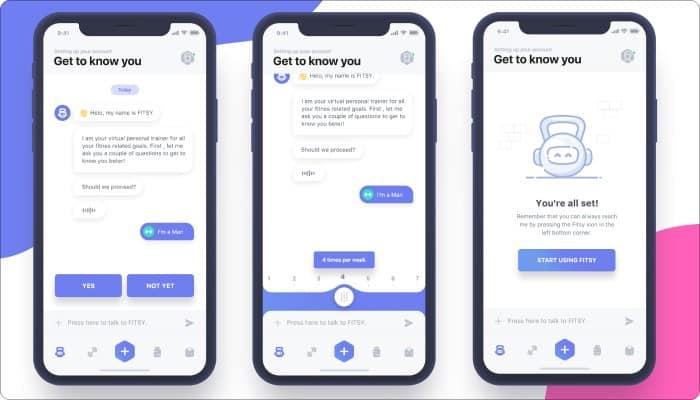
To craft dialogues that resonate authentically with your audience, consider weaving in key elements from your blog’s tone and style. Whether your voice is playful, professional, or conversational, it’s important that the chatbot mirrors this personality to maintain consistency. Start by defining common phrases or language quirks you use and embed them into the chatbot’s responses. Utilize natural language processing tools to ensure the conversation flows smoothly and feels human-like. Moreover, map out potential user intents and prepare responses that not only answer queries but also encourage further interaction. Here are a few tips to keep in mind:
- Analyze your blog posts to identify recurring themes and vocabulary.
- Use conversational triggers that invite users to share opinions or feedback.
- Maintain brevity and clarity while keeping responses warm and relatable.
- Incorporate personality traits such as humor, empathy, or authority as appropriate.
Implementing and Optimizing Your Chatbot for Enhanced Reader Interaction
To truly maximize the impact of your chatbot, focus on continuous refinement and user-centric adjustments. Start by analyzing interaction data to identify common questions and gaps in responses. Regularly update your chatbot’s knowledge base to keep it relevant and engaging. Incorporate personalized greetings and context-aware suggestions to create a seamless conversational experience. Additionally, leverage multimedia elements like images, videos, or quick-reply buttons to enrich the interaction. Here’s a quick checklist to optimize your chatbot effectively:
- Monitor real-time user engagement and pinpoint drop-off points
- Test different dialogue flows for clarity and brevity
- Implement feedback loops for readers to rate chatbot responses
- Ensure mobile compatibility for on-the-go users
- Automate routine tasks to keep the conversation dynamic
| Optimization Aspect | Benefit | Frequency |
|---|---|---|
| Content Updates | Keeps answers current | Weekly |
| User Feedback Analysis | Improves response accuracy | Monthly |
| Performance Monitoring | Enhances responsiveness | Ongoing |
Q&A
Q&A: How to Create a Custom Chatbot for Your Blog
Q1: Why should I consider adding a chatbot to my blog?
A1: A chatbot can enhance visitor engagement by offering instant responses, guiding users through your content, and even collecting feedback. It creates a more interactive experience, making your blog feel alive and attentive to readers’ needs 24/7.
Q2: What are the first steps to building a custom chatbot for a blog?
A2: Start by defining your chatbot’s purpose. Do you want it to answer FAQs, recommend articles, or gather email subscriptions? Next, choose a platform or tool that fits your technical skills-ranging from no-code builders to custom-coded solutions.
Q3: Which chatbot-building platforms are beginner-friendly for bloggers?
A3: Tools like Chatfuel, ManyChat, and Tars provide intuitive drag-and-drop interfaces. They don’t require programming knowledge and allow you to integrate with your blog easily. For WordPress users, plugins like WP-Chatbot simplify installation.
Q4: How can I make my chatbot feel “custom” rather than generic?
A4: Personalize its language and responses to match your blog’s voice and style. Add character by giving it a name or persona. Also, tailor its conversational flow to address the specific interests and questions of your audience.
Q5: Do I need coding skills to create an effective chatbot?
A5: Not necessarily. Many chatbot platforms offer powerful functionality without coding. However, knowing JavaScript or Python lets you build more advanced bots with custom features and integrations.
Q6: How do I integrate the chatbot into my blog?
A6: Most chatbot tools provide simple embed codes or WordPress plugins. You just insert these snippets into your blog’s header, footer, or widget area, and the chatbot will appear on your site.
Q7: What kind of content should my chatbot provide to keep visitors engaged?
A7: Your chatbot can share recent blog posts, answer common reader questions, offer personalized content suggestions, or even deliver exclusive tips and updates. Keeping conversations relevant and helpful encourages visitors to stay longer.
Q8: How do I ensure my chatbot improves over time?
A8: Regularly review chatbot interactions to identify where users get stuck or what questions are frequently asked. Use these insights to refine responses, add new conversational paths, and update content to stay aligned with your audience’s evolving needs.
Q9: Are there privacy concerns I should be aware of?
A9: Yes, especially if your chatbot collects personal data like emails or preferences. Make sure to comply with data protection laws such as GDPR by informing users and securing their consent before gathering information.
Q10: What’s the ultimate goal of adding a custom chatbot to my blog?
A10: To create a seamless, engaging, and supportive environment where your readers feel heard and valued. A well-crafted chatbot not only boosts user experience but can also drive growth by increasing retention, interaction, and conversions on your blog.
To Wrap It Up
Creating a custom chatbot for your blog is more than just a tech upgrade-it’s an invitation to transform the way you connect with your readers. By tailoring every interaction to fit your unique voice and content, you open the door to richer conversations, deeper engagement, and a more dynamic online presence. Whether you’re a coding novice or a seasoned developer, the steps laid out here offer a roadmap to bringing your very own chatbot to life. So, as you close this guide, consider this: your chatbot isn’t just a tool-it’s the next chapter in your blog’s story, ready to welcome visitors with a personal touch that keeps them coming back for more.